
Trade compliance software: what it is, what it should do, and how to choose the right platform
Trade compliance managers are being asked to move faster while tariff schedules, trade remedies, and regulatory requirements change more often and impact margin more directly. If your process depends on spreadsheets, email threads with brokers, or a legacy GTM module optimized for record-keeping, you can end up with slow classification cycles, inconsistent HS decisions across teams, and limited visibility into duty exposure until after entries are filed.
Modern trade compliance software should help you make decisions earlier in the product and purchasing lifecycle, not just document what happened. That means accurate tariff classification support, up-to-date regulatory intelligence, automated duty and landed cost calculations, and monitoring for changes that create new exposure. Quickcode focuses on these high-impact workflows, including a tariff calculator for duty and landed cost analysis and trade compliance monitoring for continuous monitoring, so teams can prioritize risk and cost drivers instead of maintaining static rules.
This guide defines trade compliance software, outlines the capabilities that matter most for import compliance, explains where legacy approaches fall short, and provides a practical framework to evaluate tools based on accuracy, speed, and audit readiness.
What is trade compliance software (and what it is not)
Trade compliance software is a set of tools that helps companies comply with import and export regulations by structuring decisions such as HS classification, duty and tax calculation, license and restricted-party screening, documentation, and audit evidence.
For transactional search intent, the key point is scope. Many “global trade management software” suites aim to cover everything, including filings, denied party screening, document generation, and connectivity to brokers or government systems. Those capabilities can be valuable, but they do not automatically solve the two areas that typically create the most cost and audit risk for importers: (1) tariff classification at scale and (2) keeping duty calculations aligned with changing tariffs, AD/CVD actions, and policy updates.
A practical definition for buyers: trade compliance software should help you consistently classify products, quantify duty impact before you buy or ship, and maintain audit-ready rationale when regulations change. If the system mainly stores records after the fact, it may not materially reduce misclassification risk or improve landed cost decisions.
Why legacy GTM and broker-centric workflows break down
Many teams rely on a customs broker to classify items and file entries, sometimes with an internal GTM module to manage product master data. This can work until volume, change frequency, or product complexity increases.
Common failure points:
1) Classification throughput is constrained by people, not process
When classification takes hours per item across research, ruling review, and internal approvals, onboarding new products slows. The result is late-stage rework, inconsistent decisions across regions, and pressure to “reuse” old codes that are close but not correct.
2) Static rules cannot keep up with dynamic trade policy
If your system depends on manually maintained rules and reference tables, it is hard to keep pace with tariff changes, exclusions, and trade actions. Teams spend time updating logic instead of reviewing true exceptions.
3) Duty impact is discovered too late
If landed cost is calculated only after classification is finalized or after entries are filed, sourcing and procurement decisions miss opportunities for savings or risk avoidance. Quick validation earlier is often more valuable than perfect reporting later. For a duty-focused view, the tariff calculator highlights what a purpose-built calculator should support.
4) Broker back-and-forth becomes the operating model
Brokers are essential partners, but relying on them as the primary classification engine can reduce internal consistency and make audit defense harder. Importers remain responsible for reasonable care, including having a repeatable rationale for HS decisions and changes.
5) Change management becomes reactive
Without monitoring, teams learn about regulatory changes after an issue appears in clearance delays, post-entry corrections, or internal audits. A monitoring capability supports proactive triage by flagging items likely affected by new actions.
Core capabilities to require in trade compliance software
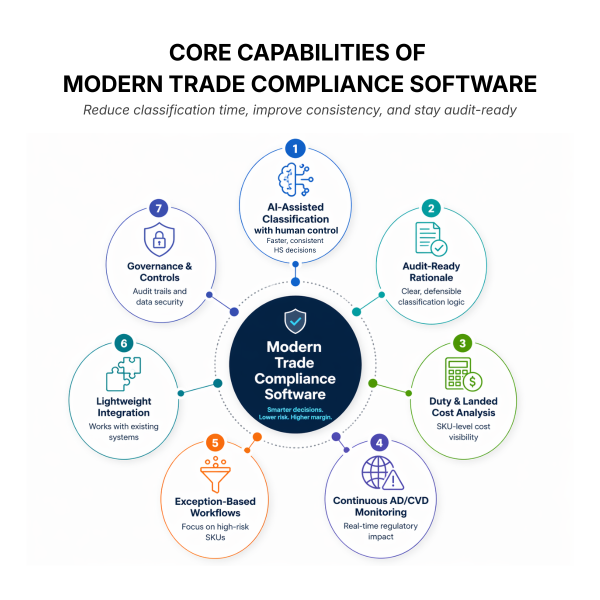
When evaluating trade compliance software for import workflows, focus on capabilities that measurably reduce time, improve consistency, and strengthen audit readiness.
1) AI-assisted tariff classification support with human control
Look for a system that accelerates research and suggests candidate HS codes based on product attributes, prior decisions, and supporting references, while keeping humans in control of final decisions. It should support consistent application across SKUs, not one-off guesses.
2) Audit-ready documentation and classification rationale
A strong platform stores the “why” behind a classification, not just the code. This includes the product description used, key attributes, comparable decisions, and the reasoning that supports the selection. This helps during audits, internal reviews, and when staff changes.
3) Automated duty calculation and product-level landed cost impact
Duty is not a single field. It can involve base duty rates, additional duties, and trade remedy exposure. Your tool should quantify duty impact at the SKU level and allow scenario analysis when sourcing changes or when new tariffs appear.
4) Continuous monitoring for AD/CVD and regulatory changes
Because trade actions can change exposure quickly, monitoring should be continuous, not quarterly. Monitoring should flag what changed, what products may be affected, and what you need to review. For tools that help with proactive checks, see Trade Compliance Features.
5) Exception-based workflows built for import compliance
The goal is to highlight the small set of SKUs that create the most risk or cost impact, so analysts can focus effort where it matters. A system that buries users in tasks without prioritization often recreates spreadsheet pain inside a new UI.
6) Lightweight deployment and integration into existing systems
Import compliance teams rarely have bandwidth for a heavy, multi-quarter implementation. Favor solutions that integrate with existing ERP data, product catalogs, and broker workflows without forcing a full GTM replacement.
7) Governance, controls, and security
Trade compliance decisions affect legal exposure and margin. Ask about role-based access control, change logs, data retention, and how the system handles sensitive product and supplier data.
A practical evaluation framework: 7 questions to compare vendors
Use the following framework to evaluate trade compliance software options in a way that aligns with transactional buying decisions.
1) How does the system improve classification speed without sacrificing reasonable care?
Ask for a workflow demo on your own products, including hard-to-classify items. The standard should be faster time to a defensible recommendation, not just autocomplete.
2) How is accuracy measured and improved over time?
Look for feedback loops: user corrections, consistency checks across similar SKUs, and ways to enforce internal standards. You want fewer classification errors and less rework from misclassification or post-entry corrections.
3) Can it scale across large catalogs and frequent product changes?
If you manage thousands of SKUs, seasonal assortments, or engineering-driven product revisions, the tool should handle bulk operations and maintain traceability across versions.
4) What is the approach to tariff updates and policy intelligence?
Ask how quickly changes are reflected, what sources are used, and how the platform maps changes to your products. A static rules engine with manual table updates will not deliver real-time visibility.
5) How does it handle AD/CVD exposure and change alerts?
You need more than a headline that something changed. Require item-level impact analysis and the ability to track which SKUs were reviewed and what action was taken.
6) What does integration look like in practice?
Ask exactly what data is required to start (product descriptions, attributes, prior HS codes, supplier and country data), what formats are supported, and how updates are synced. Integration should fit your current workflows, not demand a rebuild.
7) What is the ROI case and how is it validated?
A credible ROI model links to proof points you can observe: reduced classification time from hours to minutes for many products, improved accuracy and consistency across SKUs, reduced spreadsheet dependency and broker back-and-forth, and better landed cost visibility at the product level. Tie benefits to measurable outcomes: fewer escalations, fewer post-entry corrections, and faster onboarding of new items.
Addressing common objections (what to verify during a pilot)
Objection: “We already use a customs broker or a GTM system.”
Brokers and GTM systems are important, but they do not replace an importer’s responsibility for reasonable care or solve classification at scale. Verify whether your current stack provides consistent classification rationale, proactive change monitoring, and product-level duty impact before purchasing decisions.
Objection: “Implementation will be complex.”
Ask vendors to show a phased rollout: start with high-impact categories, import lanes, or a subset of SKUs. Prioritize a lightweight deployment that connects to your product master and produces useful outputs quickly.
Objection: “Integration with ERP will be difficult.”
Integration should be defined by a minimum viable dataset and a clear mapping. During a pilot, test data ingestion, update cadence, and how exceptions are handled when descriptions or attributes are incomplete.
Objection: “Our data quality will limit effectiveness.”
This is common. The right approach is to use the tool to reveal data gaps and create structured attribute requirements for high-risk categories. Start where product data is strongest, then expand.
Objection: “AI accuracy is uncertain and compliance risk is too high to trust automation.”
Do not treat AI as autopilot. Require human approval, visible rationale, and audit trails. Validate on your edge cases. The value is faster research and more consistent decision-making, with your team retaining control.
Objection: “ROI is unclear.”
Quantify where time and cost are currently spent: classification research hours, broker fees for repeated questions, rework from misclassification and tariff errors during entry, and delays in onboarding new products. Then measure pilot impact using the same metrics.
For guidance on why having the right data upfront matters to the buying decision, see The Importance of Knowing Trade Compliance.
How modern trade compliance software supports proactive decisions
The most effective import compliance teams operate upstream. Instead of waiting for entry filing to expose issues, they assess classification and duty implications during product onboarding, sourcing, and purchase order planning.
A modern platform supports this operating model by:
– Speeding classification so new products can be onboarded without creating a backlog
– Improving consistency by standardizing attributes, rationale, and review workflows across regions
– Quantifying duty and landed cost impacts at the product level so procurement and finance can act early
– Monitoring changes that introduce new exposure, including AD/CVD actions and tariff updates
– Surfacing exceptions and high-risk items for prioritized review rather than flooding teams with alerts
The outcome is not just better record-keeping. It is faster decision-making with better control of import costs and compliance risk.
FAQs
At minimum: tariff classification support with audit-ready rationale, automated duty calculation with landed cost visibility, and continuous monitoring for tariff and regulatory changes that can affect your products. Integration into your product master and workflows is also critical so the system is used daily, not only during audits.
They overlap. GTM suites often cover broad processes like filings, documentation, and partner connectivity. Trade compliance software can be broader or more focused, but many import teams specifically need deeper capability in classification, duty calculation, and regulatory intelligence that drives decisions upstream.
Yes, when implemented as decision support with strong controls. Require human approval, transparency into why a code is suggested, consistent application across similar items, and audit logs. Use a pilot to validate performance on your most complex products and to ensure the workflow supports reasonable care.
Start with measurable baselines: time to classify items, number of SKUs waiting for classification, frequency of broker back-and-forth, post-entry corrections, and how often duty surprises occur after sourcing decisions. During a pilot, measure improvements such as reduced classification time from hours to minutes for many products, improved consistency across SKUs, and better product-level landed cost visibility.
Typically: product descriptions, key attributes that affect classification (materials, size, capacity, etc), prior HS codes (if available), country of origin, supplier data, and any internal notes or rulings used previously. Even if data is imperfect, a phased rollout can start with categories where attributes are strongest and use the process to standardize what “good” product data looks like.
If you are evaluating trade compliance software to accelerate classification, quantify duty impact earlier, and stay ahead of regulatory changes, Quickcode is purpose-built for import compliance workflows. Book a meeting to walk through your product data, validate classification and duty use cases, and scope a low-lift pilot tied to clear accuracy, speed, and audit-readiness metrics.